The VPC That Isn’t a VPC: A Network Engineer Learns Cloud
Learning AWS with a network engineering background. A lot of the terms turned out to be new names for old ideas. What’s really different is how the cloud is run.
Baca dalam Bahasa Indonesia →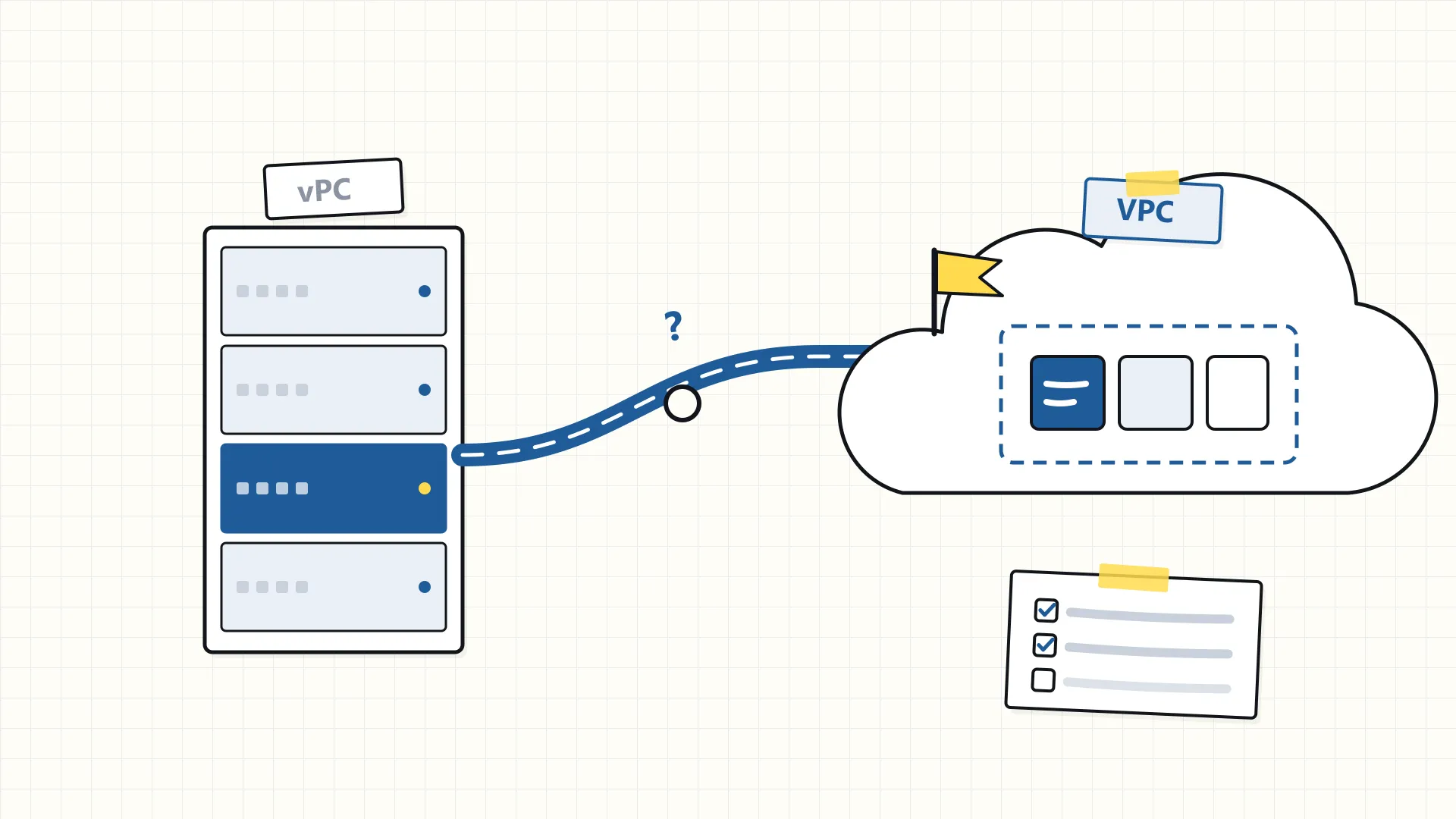
On this page
The first time I saw “VPC” in AWS material, my mind went straight to virtual Port Channel. Fair enough, since for years the VPC I knew was a Cisco Nexus feature, the one that makes links from two switches look like a single port channel. In AWS, it turns out VPC stands for Virtual Private Cloud, something completely different.
That small moment sums up what it’s like to start learning cloud with a networking background. A lot of things sound foreign, even when they aren’t really new. So how much of what we know from on-premise actually carries over to the cloud?
Years With Physical/On-Prem Gear
My career started as a network engineer at an IT consulting firm in Jakarta. As the title suggests, most of my time went into routing and switching.
For years, my work revolved around routers, switches and access points. If I’d been dating someone back then, they’d probably have seen less of me than these devices did.
Almost everything I was responsible for was physical. There were a few virtual machines, but only a handful. When something broke, you could walk up to the device, check the lights and trace the cables.
In OSI terms, network engineers mostly live in layers 1 to 3, with a bit of layer 4. We spend a lot of time on connectivity, spanning tree, ARP, IP and routing. All of it runs on devices you can see and touch.
When Cloud Lands on the Desk
A few years later, my responsibilities grew. It wasn’t just layers 1 to 3 anymore. It was pretty much the whole infrastructure. So naturally, I had to pay attention to the technology everyone was talking about, and that was cloud.
To be fair, cloud isn’t new. The technology has been around for years, and most of us have used it every day without thinking about it. Google Drive is just one small example.
But Google Drive is SaaS, a service you simply use without needing to know what’s behind it. What you learn in AWS is mostly infrastructure, or IaaS. There, you’re the one building the network, the servers and the security around them. Using cloud services and being responsible for infrastructure in the cloud turn out to be two very different things.
As someone responsible for infrastructure at a company, I was more or less “forced” to keep up. That makes sense, because cloud changes two things that matter to a business.
The first is cost. Companies used to buy hardware upfront, as a big capital investment (capex). Now they can pay monthly for what they use (opex). The second is speed. A server that used to wait weeks for procurement can now be ready in minutes. Sooner or later, questions about cloud will land on our desks.
Starting With a Certification Path
I tried a few things, including asking friends who’d moved into cloud earlier, whether as cloud engineers, cloud architects or in other cloud roles. At that stage, when I was still watching from the outside rather than really learning, a lot of the terms were hard to follow. Besides VPC, there was EC2, Security Group, Route 53 and plenty more.
I like learning in a structured way, so I went with a certification path. For AWS, the starting point was AWS Certified Cloud Practitioner (CLF-C02), its most foundational certification.
The reason is simple. A certification path gives you a map. I knew where to start, what came next, and when I’d be ready to move up a level. Without a map like that, learning cloud can easily turn into jumping from one tutorial to the next.
I think following certification modules has a lot going for it. You don’t have to take the exam. But if you have the budget and the time, getting certified is even better.
Of course, the map isn’t the territory. The modules explain the concepts and how AWS thinks about its services. A fuller understanding usually comes from trying things yourself, for example on the AWS free tier.
At the Basic Level, a Lot Feels Familiar
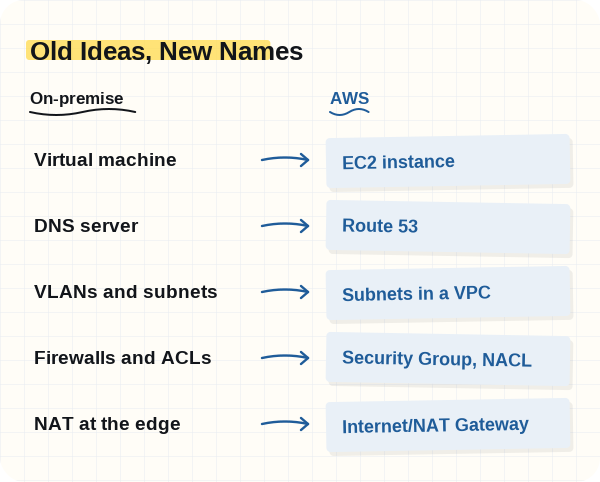
Once I actually started learning, some things I’d assumed were complicated turned out to be just different names, at least at the basic infrastructure level. We’ve known these concepts on-premise for years. AWS simply gives them its own names, and Azure and Google Cloud do the same with names of their own.
A virtual machine is an EC2 instance in AWS. DNS, which we’d normally run on a DNS server, lives in Route 53. The network segments we usually split with VLANs and subnets become subnets inside a VPC, with route tables deciding where traffic goes.
Firewalls have their equivalents too. A Security Group works like a stateful firewall attached to each instance, while a Network ACL works at the subnet level and is stateless, much like an access list on a router. For a network engineer, that stateful versus stateless split feels familiar straight away.
Internet access follows the same pattern. On-premise, if an internal resource needs to reach the internet or be reachable from it, we NAT it toward the provider. In AWS, that job belongs to the Internet Gateway and the NAT Gateway. The Internet Gateway opens a two-way path for resources with a public IP, while the NAT Gateway lets resources in a private subnet reach the internet without being reachable from outside.
What’s Really Different Is How It’s Run
But the further I went, the clearer it became that “it’s just different names” is only half the story. That mapping holds at the basic infrastructure level. What’s really different is how everything is run.
On-premise, we configure devices one by one. In the cloud, everything can be created through an API, or even written as code. Servers, networks and firewalls can be spun up and torn down in minutes.
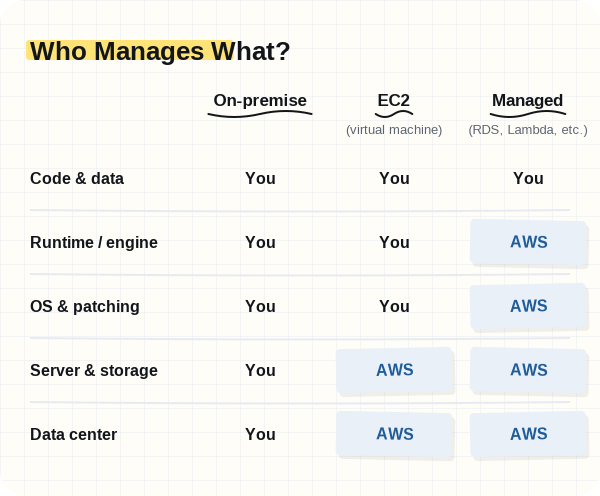
Then there are services with no real on-premise equivalent. Amazon S3, RDS and Lambda aren’t renamed servers. With services like these, some of the layers we used to manage ourselves, from the operating system to patching, are handled by AWS.
The way we think about failure changes too. On-premise, we try to make the hardware as reliable as possible. In the cloud, we assume an instance, or even a whole availability zone, can fail, and design the system to keep running anyway, for example by spreading resources across several availability zones.
Cost becomes part of the design as well. We don’t deal with cables or spanning tree anymore, but every architecture decision now comes with a monthly bill attached. That’s something network engineers rarely had to think about before, and comparing cloud and on-prem TCO is one way to see it.
So AWS isn’t as scary as I’d imagined. It was the unfamiliar terms at the start that made it confusing. But learning the terms is only the first step. Shifting from managing devices to managing services takes a lot longer.
Network Basics Still Pay Off
The Cloud Practitioner module does cover networking, but not in much depth. If all you want is to operate the cloud, that might be enough. But if you want to understand it in detail, strong networking fundamentals matter, and they start to matter at the design stage.
Take creating a VPC. You have to choose its IP range up front, and ideally it shouldn’t clash with the office network or with other VPCs you might need to connect later over VPN or Direct Connect. For anyone used to making an IP plan, that’s routine. For anyone who isn’t, it’s a mistake that only shows up once everything is running and hard to change.
There’s also something that doesn’t get talked about much, and that’s traffic cost. In AWS, traffic going out to the internet, moving between availability zones or passing through a NAT Gateway is charged. People who are used to thinking in traffic flows will spot a quietly expensive design sooner. Here, network basics help keep costs in check.
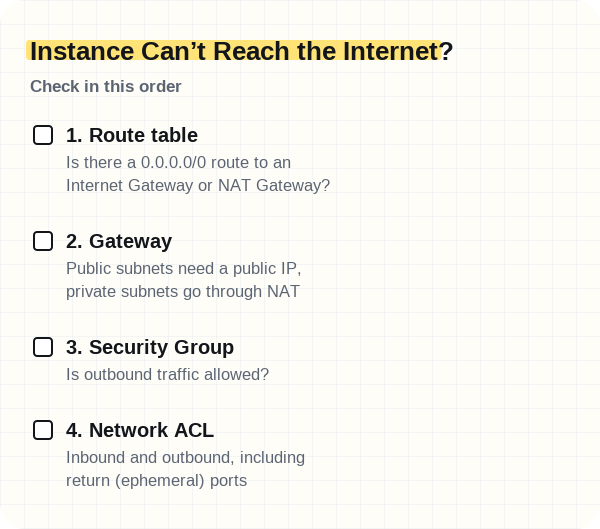
Troubleshooting works the same way. When an instance can’t reach the internet, the thinking is much like on-premise. Check the route table, check the gateway, check the Security Group and Network ACL, then trace the traffic path step by step. The devices have turned into menus in a console, but the logic hasn’t changed.
So, Who Does What?
There’s something else I only noticed after learning cloud. On-premise, the split of responsibilities is usually easy to see. Security engineers focus on security and security products. Network engineers focus on routers, switches and routing. Database administrators focus on databases.
In the cloud, it feels different. The Cloud Practitioner module alone covers the work of several roles at once, from network, servers, security and databases to billing and governance. The AWS console is the same. From one dashboard, you can create VMs, manage security, load balancers, databases and a lot more.
So if everything sits in one dashboard, does segregation of roles still exist? What are the rules? Is it just down to what the team agrees on?
It can look as if those roles have merged into one. But on a second look, that impression doesn’t quite hold.
Cloud Practitioner covers everything because it’s meant for everyone, including non-technical people in sales, finance or management. A broad syllabus doesn’t mean one person does all of it.
One console doesn’t mean one role either. Even on-premise, a domain admin with full rights could touch almost anything. Roles have always been separated by access rights and process, not by different screens.
In AWS, those access rights are handled by IAM. A network engineer who only has network permissions can’t change a database, even in the same console. AWS also has the shared responsibility model, which splits responsibility between AWS and its customers. So technically, the tools to separate roles are already there.
What really changes is something else. With infrastructure as code, DevOps and the rise of platform teams, the line between who builds and who operates is getting blurrier. Should Security Groups belong to the network team or the security team? Who keeps an eye on costs? Questions like these are closer to organisational decisions than technical ones.
For now, I don’t know for sure what best practice looks like in the real world. The most sensible approach might be to split roles based on what we already understand, while staying open to changing it as we learn more.
What Now?
I’ve finished the AWS Cloud Practitioner module. Next, I’ll go deeper through the AWS Certified Solutions Architect Associate path. The approach stays the same. Work through the modules first, then take the exam once I feel ready.
There’s still a lot to learn, and it’s a mixed bag. Microservices is a way of designing applications. Docker is a tool for building and running containers. ECS and EKS are AWS services for running those containers, with EKS being managed Kubernetes.
VPC felt foreign once too, and it turned out to be mostly a matter of names. This time feels different. Containers and microservices bring a new way of thinking, not just new names, and that’s what I’ll be learning next. I’ll share how it goes here.