Maintenance Announcement Template
Ready-to-send messages for planned maintenance, from the first notice to the all-clear, so users know what will be down, when, and what to do.
Planned maintenance rarely causes trouble because of the work itself. Trouble starts when people find out at the last minute, in the middle of something important, with no idea how long the service will be down.
A short, clear notice sent early solves most of that. Users can plan around it, the service desk can answer questions, and managers don't hear about it for the first time from a frustrated team.
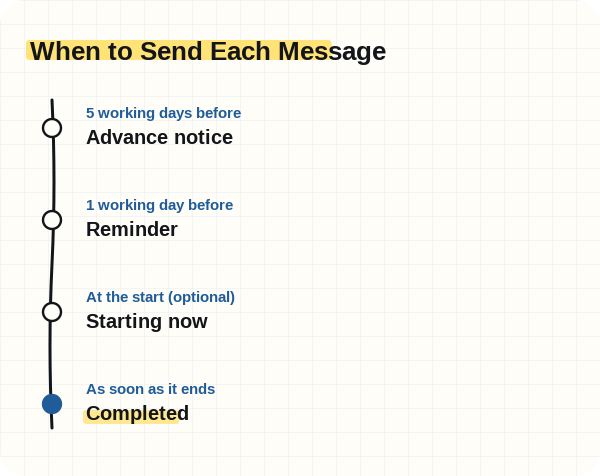
1. Advance Notice (5 Working Days Before)
[Planned Maintenance] [Service name] on [day, date]
[Service] will be unavailable on [day, date] from [start time] to [end time] [time zone] while we [reason in plain words, e.g. upgrade the email server].
Who is affected: [teams, sites or "all users"]
What you need to do: [e.g. save your work and log out before [time] / nothing]
During the maintenance: [workaround, e.g. use webmail / "No workaround is available"]
Questions? Contact the service desk at [contact].
2. Reminder (1 Working Day Before)
[Reminder] [Service name] maintenance tomorrow, [start time] to [end time]
A reminder that [service] will be unavailable tomorrow, [date], from [start time] to [end time].
Please [action, e.g. save open files and log out] before [time]. We'll let you know as soon as the work is done.
3. Starting Now
This one is optional. It helps when the work happens during office hours, or for services people use all day.
[In Progress] [Service name] maintenance has started
Maintenance on [service] has started and should finish by [end time]. The service will be unavailable until then.
4. Completed
[Completed] [Service name] is available again
Maintenance on [service] finished at [time], and the service is available again.
If anything isn't working as expected, please contact the service desk at [contact].
5. Extended or Cancelled
Send this before the planned end time, not after it. If the maintenance turns into an outage, switch to the incident communication template.
[Update] [Service name] maintenance [extended / cancelled]
The maintenance on [service] [will take longer than planned / has been cancelled]. [New end time or new date, if known].
Reason: [one sentence in plain words]
Next update: [time]
Check Before You Send
- The window includes the time zone, and the day of the week matches the date
- The service name is the one users know, not the server name
- Users know what to do before, during and after the work
- The service desk gets the notice before users do
- The change is approved, and its change request has a rollback plan
- For a service with an SLA, the window sits inside the agreed maintenance time