Change Request Template with Rollback Plan
A change request that gives reviewers what they need to approve it: the reason, the risk, how you'll test it, and how you'll undo it if it goes wrong.
Most changes go fine. The ones that hurt usually skipped something small. Nobody checked what else depended on the system, the rollback plan said "restore from backup" without knowing how long that takes, or the change landed in the middle of month-end closing.
A good change request turns those questions into part of the form. It also makes approval faster, because reviewers don't have to chase the same details every week.
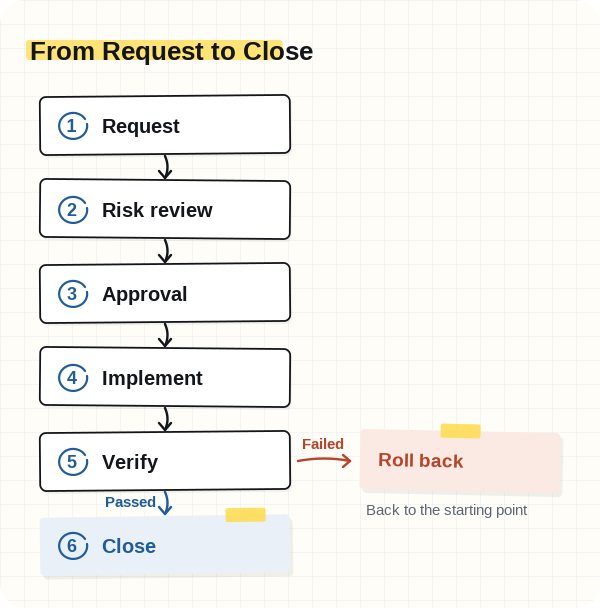
1. Change Details
Title: [short and specific, e.g. "Upgrade core switch firmware at head office"]
Requested by: [name, team]
Change owner: [who does the work]
Change type: [Standard / Normal / Emergency]
Planned window: [date], [start time] to [end time] [time zone]
Systems affected: [services, servers, sites]
2. Reason and Expected Result
Why: [the problem or need, in one or two sentences]
What changes: [what will be different afterwards]
If we wait: [the risk of delaying or not doing it]
3. Impact and Risk
A quick way to judge the risk: how many people would notice if it failed, and how hard is it to undo?
Who is affected: [users, teams, customers]
Downtime: [none / expected duration]
Dependencies: [systems, interfaces or vendors that rely on this]
Risk level: [Low / Medium / High], because [reason]
What could go wrong: [the most likely problem, and the worst case]
4. Implementation Plan
Write the steps so someone else on the team could follow them at 2 am.
| Step | Action | Who | Time |
|---|---|---|---|
| 1 | [e.g. Confirm backups and take a config snapshot] | [name] | [22:00] |
| 2 | [e.g. Upgrade the standby unit] | [name] | [22:15] |
| 3 | [e.g. Fail over and upgrade the primary unit] | [name] | [22:45] |
| 4 | [Run the checks in section 5] | [name] | [23:30] |
5. Testing and Verification
Tested before: [where and how, e.g. in staging or on one site first, or why testing wasn't possible]
Checks after the change: [e.g. login works, a sample transaction goes through, monitoring is green]
Success means: [the result that lets you close the change]
6. Rollback Plan
Set the rollback deadline inside the window. If the work runs late, there should still be enough time to undo it before users come back.
Roll back if: [e.g. any check fails, or the work isn't finished by [time]]
Decision by: [who makes the call]
Steps: [how to undo it, step by step]
Time needed: [how long the rollback takes]
Point of no return: [the step after which you can no longer roll back, if there is one]
7. Communication and Approval
Notify: [users, service desk, vendors], using the maintenance announcement
Approved by: [system owner], [IT manager], [CAB, if required]
Date approved: [date]
For the user notice itself, use the maintenance announcement template. Larger or riskier changes usually go to the CAB before approval.
After the Change
- Record the result: successful, partly successful, or rolled back
- Note anything that didn't go to plan
- If something went wrong, run a short review with the postmortem template
- Update the documentation and diagrams